
For wedding videographers
A workspace that speaks film
Videographers do not cull; they cut. Booksui’s videographer pipeline runs inquiry → creative brief → proposal → booked → pre-production → production → post-production → review & revisions → delivery, with the proposal carrying runtime, revision rounds and licensing terms so nothing is argued about after the edit.
Your first quote is free, no card. Then from $12/mo, with a 14-day trial.
See it in Booksui
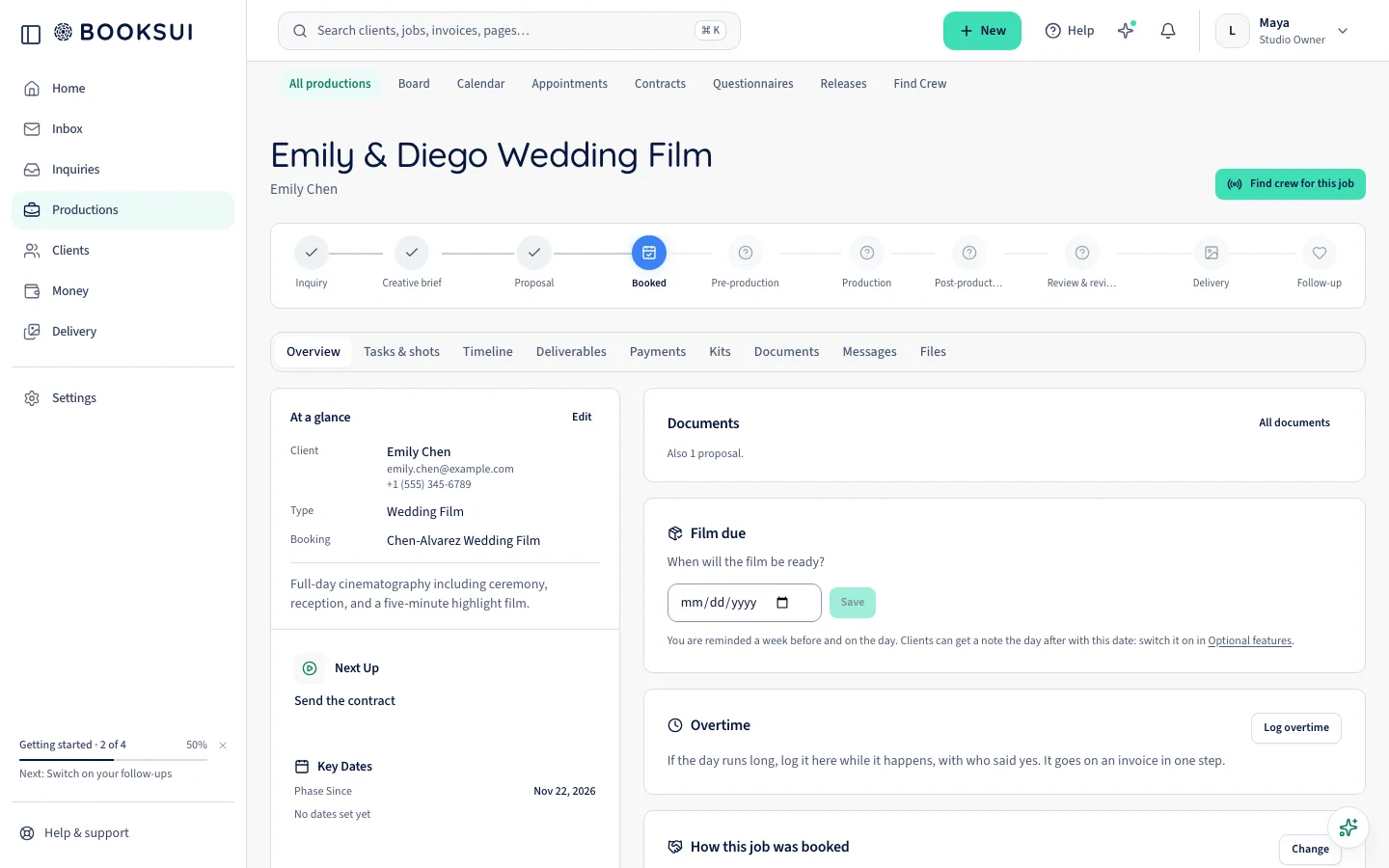
Real Booksui screens. The client, job and studio in them are Booksui’s sample data, not a customer.
The pipeline you get on day one
These are the phases the product installs for your trade, with the first items of each checklist. Rename, reorder or edit them; nothing sends on its own.
- 1
Inquiry
Reply within four hours · Confirm date, location, and deliverable length · Ask where the finished film will live — social, broadcast, or private
- 2
Creative brief
Agree the story the film is telling, not just the coverage · Confirm runtime, aspect ratio, and delivery format · Establish how many revision rounds are included
- 3
Proposal
Send within 24 hours of the brief · State runtime, revision rounds, and licence term explicitly · Separate production and post so scope changes are visible
- 4
Booked
Countersign and confirm the retainer has cleared · Book crew, and confirm their rates in writing · Reserve rental gear before the date gets close
- 5
Pre-production
Build the shot list and, where useful, a shooting schedule · Scout locations for light, power, and — critically — sound · Confirm interview questions and brief anyone speaking
- 6
Production
Record room tone at every location — it saves the edit later · Monitor audio on headphones throughout; audio failures are unfixable · Shoot coverage and cutaways, not just the hero shots
- 7
Post-production
Ingest to two drives and verify before wiping cards · Assemble the story first; colour and sound come after the cut works · Mix audio properly — poor sound reads as amateur faster than picture
- 8
Review & revisions
Send the cut from the gallery’s Delivery → Films: the client pauses, leaves notes pinned to the timecode, then approves or asks for changes · Check the round on the film’s page (“Round 1 of 2”) — it counts from the revision rounds the job includes · Consolidate feedback into one list before touching the timeline
- 9
Delivery
Confirm the balance is settled before final files go out · Export every format the client agreed to, not just the master · Deliver with the licence terms restated in writing
- 10
Follow-up
Confirm the client has everything they were promised · Ask for a review while the experience is still fresh · Request permission to share a short clip publicly
Scope written into the proposal
Highlight-film length, full-ceremony edit, number of revision rounds, delivery format and licensing are line items, so the contract the couple signs says what they will receive and how many changes are included.
Review rounds as a phase
Review & revisions is its own phase with a checklist and a client message, so the second round is a step in the record, not a forgotten email.
Feedback pinned to the moment
The couple pause the review cut in the browser and leave each note at the second it is about. Comments carry their timecode and the revision round they count against, so the edit starts from one list.
Every cut a version
The review cut, the revised cut and the final film are numbered versions of one delivery on the job; the couple always open the newest, and downloads switch on when you say.
Delivery and files
Deliver through the client’s page with download limits, and send masters through file transfers that expire when you say.
Crew for the day
When a production needs a second shooter or an extra operator, a Crew Call on the Network reaches available videographers nearby.
Questions
- Can I set revision rounds in the contract?
- Yes — as proposal line items that flow into the contract wording through merge fields.
- How do I deliver large files?
- Through file transfers on the client’s page, with expiry and download tracking.
- Can the couple comment on a specific moment?
- Yes. They pause the review cut and comment at that second; each comment carries its timecode.
- Is the pipeline editable?
- Yes: rename, reorder, and change checklists and messages.